How to Embed Substack Newsletter on Shopify: A Simple Guide

How to Embed Substack Newsletter on Shopify: A Simple Guide
Embed Substack Posts/Signup on Your Shopify Store

Looking to share Substack content with your Shopify customers? Whether you want to display your own newsletter or feature content from another creator, embedding Substack posts directly on your store keeps visitors engaged without sending them elsewhere.

This guide shows you how to embed any Substack newsletter or post on your Shopify store in just a few simple steps.

What You’ll Need:

  • A Shopify store
  • The EmbedAny app installed
  • Link to the Substack content you want to embed

Step-by-Step Instructions

Step 1: Install EmbedAny

First, install the EmbedAny app from the Shopify App Store. Once installed, the app works automatically with your store’s content editors.

Step 2: Find Your Substack Content

Choose which Substack content you want to display:

In Substack activities, there should be three dots on the top right of the post. Clicking on it, you will get the copy link option. For Substack posts, hovering on the post displays the link icon at the top-right of the post.

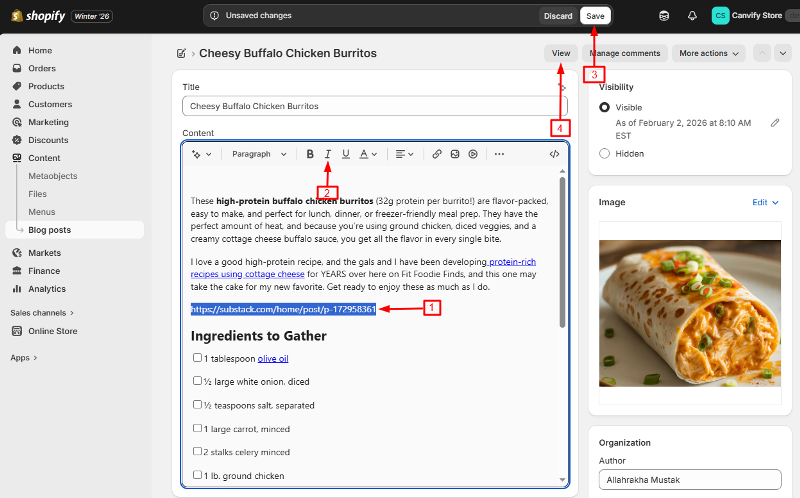
  1. Go to the page where you want to embed the Substack content (product description, blog post, or page)
  2. Open the text editor
  3. Paste the Substack link into the editor
  4. Highlight the link
  5. Click the Italic button in the text editor (or use the keyboard shortcut Ctrl+I / Cmd+I)

The link will look slanted after making it italic.

The link italicised in Shopify

Step 4: Save and Preview

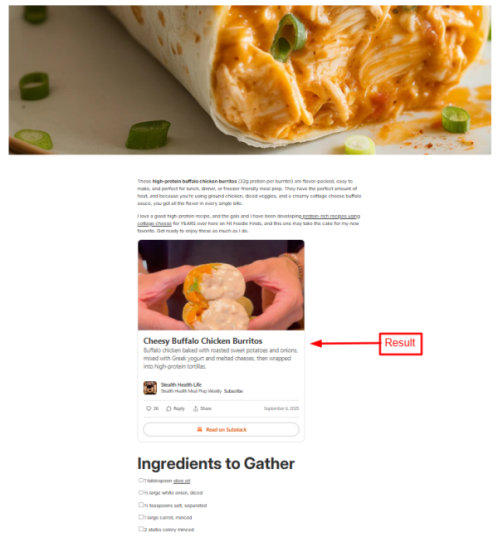
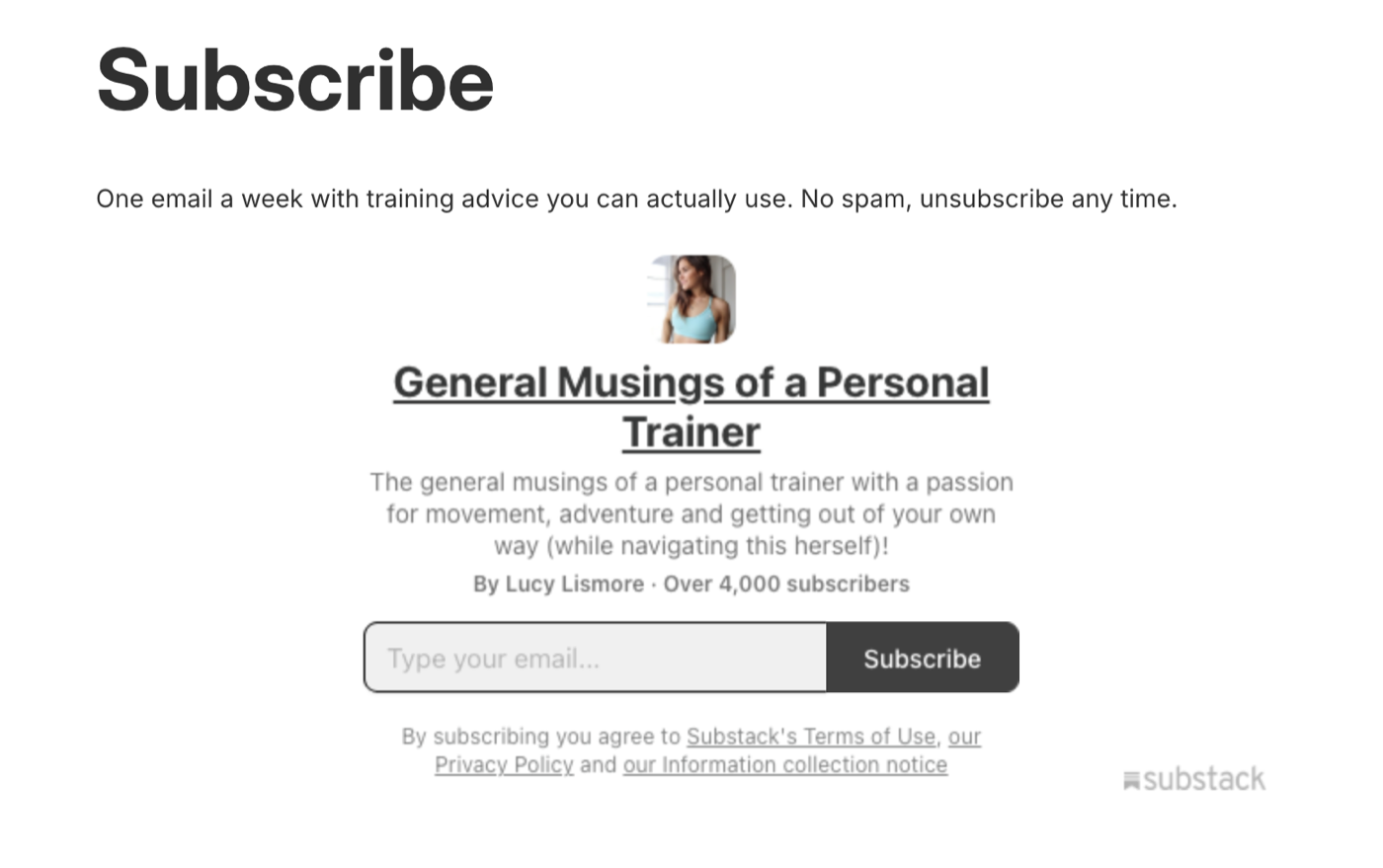
Save your changes and preview your page. The Substack link will now display as a fully interactive embedded post or a newsletter signup form.

Substack post embedded on the store

Examples of What You Can Embed

  • Newsletter signup form: Embed your Substack newsletter signup to grow subscribers directly from your store
  • Individual posts: Share specific Substack articles related to your products
  • Comments section: Include the discussion from a relevant Substack post

Why Embed Substack on Your Shopify Store?

  • Showcase your expertise: If you write a newsletter about your industry, embed it to build trust
  • Fresh content: Keep your store updated with your latest newsletter posts
  • Community building: Connect your newsletter audience with your store customers

Troubleshooting

Not seeing your embed? Make sure:

  • You’ve italicised the link properly
  • The Substack URL is correct and complete
  • The EmbedAny app is installed and active

With EmbedAny, you can embed content from 800+ platforms beyond just Substack, all using this same simple method.

More guides
How to Embed Acast Podcasts on Shopify | Ultimate Guide 2026
Learn how to easily embed Acast podcasts on your Shopify store using EmbedAny. No coding required - simply paste and italicise links to enhance your store with interactive audio content.
How to Embed Reuters News Feed on Your Shopify Store with EmbedAny
A step-by-step guide on embedding Reuters news feeds and articles on your Shopify store using EmbedAny without any coding required.
How to Embed Imajize 360° Product Views on Your Shopify Store
Learn how to easily embed interactive Imajize 360° product views on your Shopify store using EmbedAny app - no coding required.
How to Embed VidMount on Your Shopify Store: Easy Guide with EmbedAny
Learn how to easily embed VidMount content on your Shopify store using EmbedAny app, a no-code solution that enhances your product pages with interactive VidMount content.
How to Embed Sketchfab 3D Models on Your Shopify Store Using EmbedAny
A complete guide to embedding interactive Sketchfab 3D models on your Shopify store without coding, using the EmbedAny app.
Embed BuzzFeed Quizzes and Content on Your Shopify Store - Complete Guide
Learn how to easily embed interactive BuzzFeed quizzes, articles and content on your Shopify store using EmbedAny app, no coding required.