
How to Embed Substack on Shopify (Signup Form, Posts and Feed)
 Abdullah Shahid
You can embed Substack on Shopify in two ways. The free way is to paste Substack’s own embed code into a Custom Liquid section in your theme. The no-code way is to paste your Substack link into any Shopify text box with the EmbedAny app and make it italic.
Use the first method if you only need a signup form. Use the second if you also want single posts or your full Substack feed on your store.
What you can embed
| What | Substack link | Method 1 (embed code) | Method 2 (EmbedAny) |
|---|---|---|---|
| Signup form | yourname.substack.com/embed | Yes | Yes |
| Single post | yourname.substack.com/p/post-title | Yes | Yes |
| Full feed that updates itself | yourname.substack.com | No | Yes |
If your Substack runs on a custom domain, use your yourname.substack.com address for all of these.
Method 1: Substack embed code in a Custom Liquid section
This works on any Online Store 2.0 theme, such as Dawn or Horizon. It is free and needs no app.
- In Substack, copy the embed code for your signup form. It is an iframe that points to yourname.substack.com/embed.
- In Shopify, go to Online Store > Themes and click Customize.
- Open the page where you want the form, for example the home page.
- Click Add section and choose Custom Liquid.
- Paste the code into the Liquid box and click Save.
This version of the code fits most stores. Swap in your own Substack name:
<div style="max-width: 480px; margin: 0 auto;">
  <iframe src="https://yourname.substack.com/embed" width="100%" height="320" style="border: none; background: transparent;" frameborder="0" scrolling="no"></iframe>
</div>
To embed a single post, open the post on Substack, use the Share menu and copy the embed code. Paste it into a Custom Liquid section the same way.
Fixing common layout problems
- The form is stuck to the left. Wrap it in a div with
margin: 0 auto, as in the code above. - There is a white box around it. Set
border: noneandbackground: transparenton the iframe. The form itself keeps Substack’s colours. - It is cut off at the bottom. Raise the
heightvalue until the whole form shows. - You want it in the footer. Add the Custom Liquid section to the Footer group in the theme editor instead of a page.
Substack has no embed code for a full feed. For that, use Method 2.
Method 2: EmbedAny (no code, includes the feed)
EmbedAny turns links into embeds. It works anywhere you can type text in Shopify: pages, blog posts, product descriptions and rich text sections.
- Install EmbedAny from the Shopify App Store.
- Open the page, product or blog post where you want the embed.
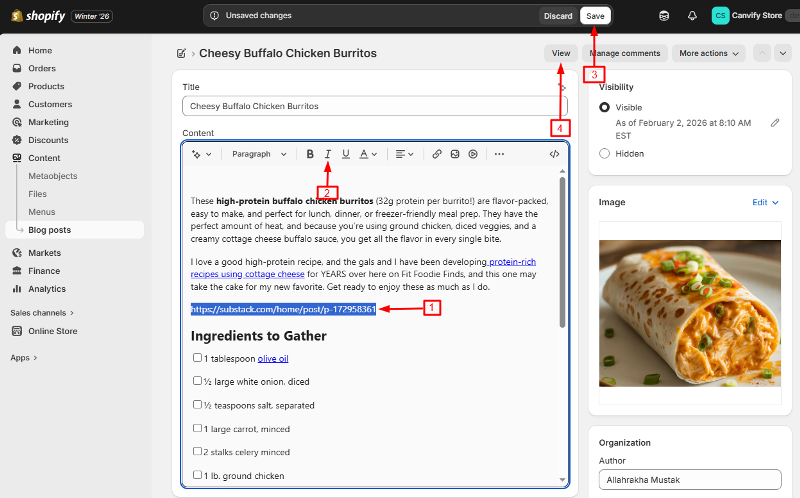
- Paste your Substack link.
- Select the link and press Ctrl+I (Cmd+I on Mac) to make it italic.
- Save.
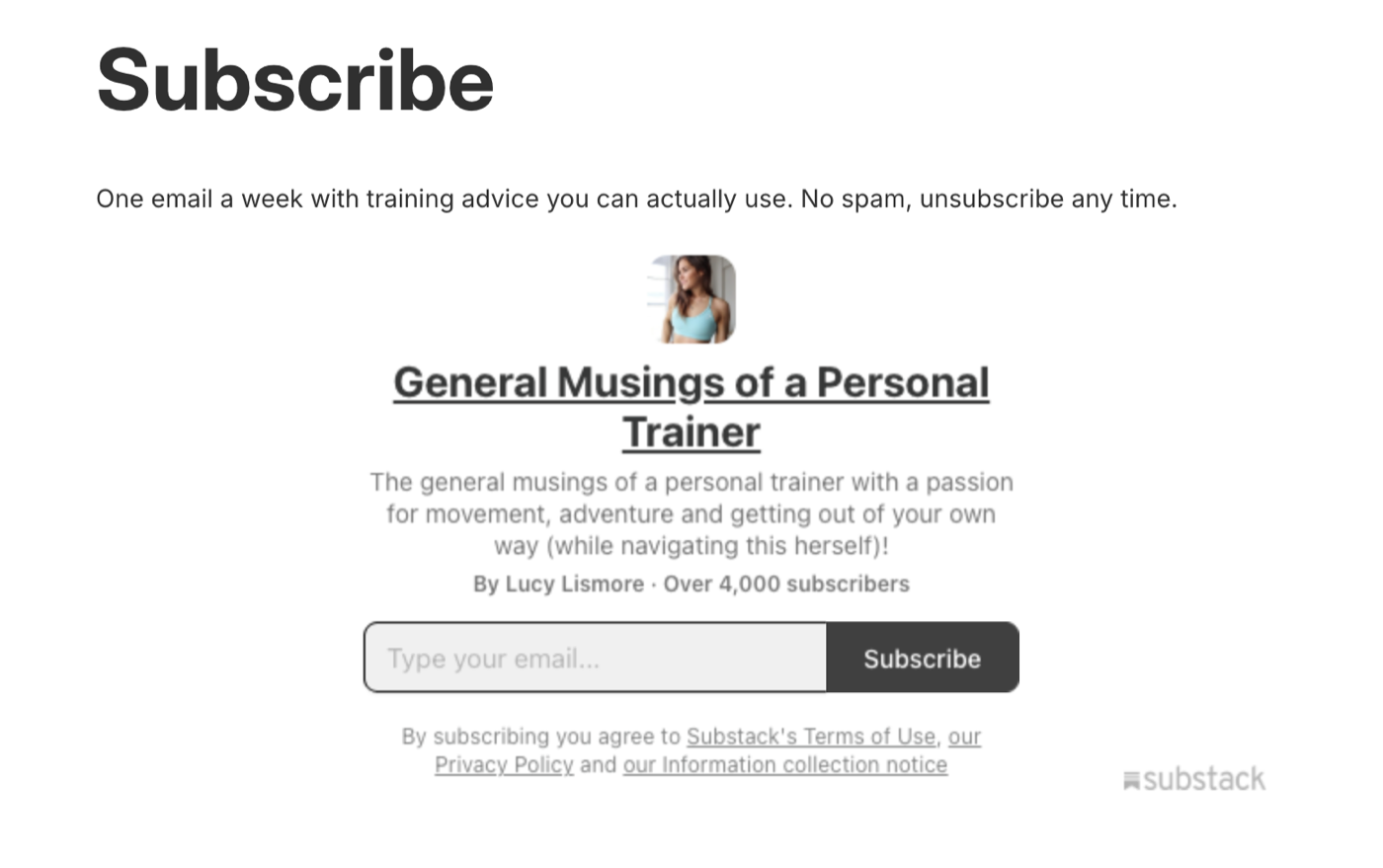
Signup form
Paste yourname.substack.com/embed and make it italic. Visitors can subscribe without leaving your store.
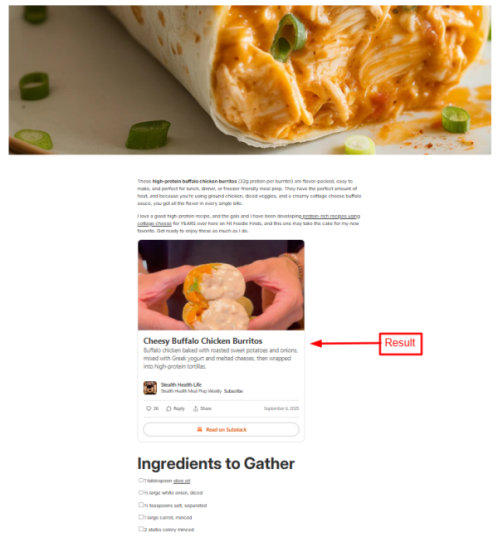
Single post
Paste a post link ending in /p/post-title. It shows as a card with the image, subtitle and a Read on Substack button. This works well inside a related blog post or on a product page.
Full feed as your store blog
Paste your main link, yourname.substack.com, on its own page. Your whole publication appears as a feed and updates itself each time you publish. You can use it instead of running a separate Shopify blog.
Here is a short video of the italic trick on Shopify:
Which method to pick
- Only a signup form, on one page: Method 1 is free and quick.
- Posts inside product pages or blog posts: Method 2, because Custom Liquid sections cannot go inside a product description or a blog post.
- A blog feed that stays up to date: Method 2. Substack does not offer this as embed code.
Quick answers
Custom domains. Use your yourname.substack.com address. It points to the same publication.
Subscribers. People who sign up through an embedded form land in your normal Substack subscriber list, the same as signing up on Substack.
Why put Substack on your store
Your Substack readers already trust your writing. Your store visitors already like your products. Putting the two together lets each group find the other. Readers find the shop, and shoppers find the newsletter that keeps them coming back between orders.
For a shorter version with only the EmbedAny steps, see Substack link types that work on Shopify.