How to Embed TikTok Videos on Shopify Stores - Complete Guide

Adding TikTok videos to your Shopify store is a brilliant way to showcase products, share customer reviews, and create an engaging shopping experience. With TikTok’s massive popularity, embedding these videos can significantly boost your store’s engagement and conversion rates.
Why Embed TikTok Videos on Your Shopify Store?
- Showcase products in action through entertaining short-form videos
- Share authentic customer reviews and testimonials
- Keep visitors on your site longer with engaging content
- Boost social proof by displaying your TikTok presence
How to Embed TikTok Videos on Shopify with EmbedAny
Step 1: Install the EmbedAny App
First, you’ll need to install the EmbedAny app from the Shopify App Store:
- Visit EmbedAny on the Shopify App Store
- Click “Add app” and follow the installation prompts
- Once installed, the app will be automatically activated on your store
Step 2: Find the TikTok Video You Want to Embed
- Open TikTok on your mobile or desktop
- Navigate to the video you want to embed
- Tap the “Share” button
- Select “Copy link” to copy the video URL to your clipboard
Step 3: Add the TikTok Video to Your Shopify Store
- Go to your Shopify admin panel
- Navigate to the product, page, or blog post where you want to add the TikTok video
- Paste the TikTok link in the description or content section
- Important: Make the link italic by selecting it and clicking the italic button (or using Ctrl+I/Cmd+I)
- Save your changes
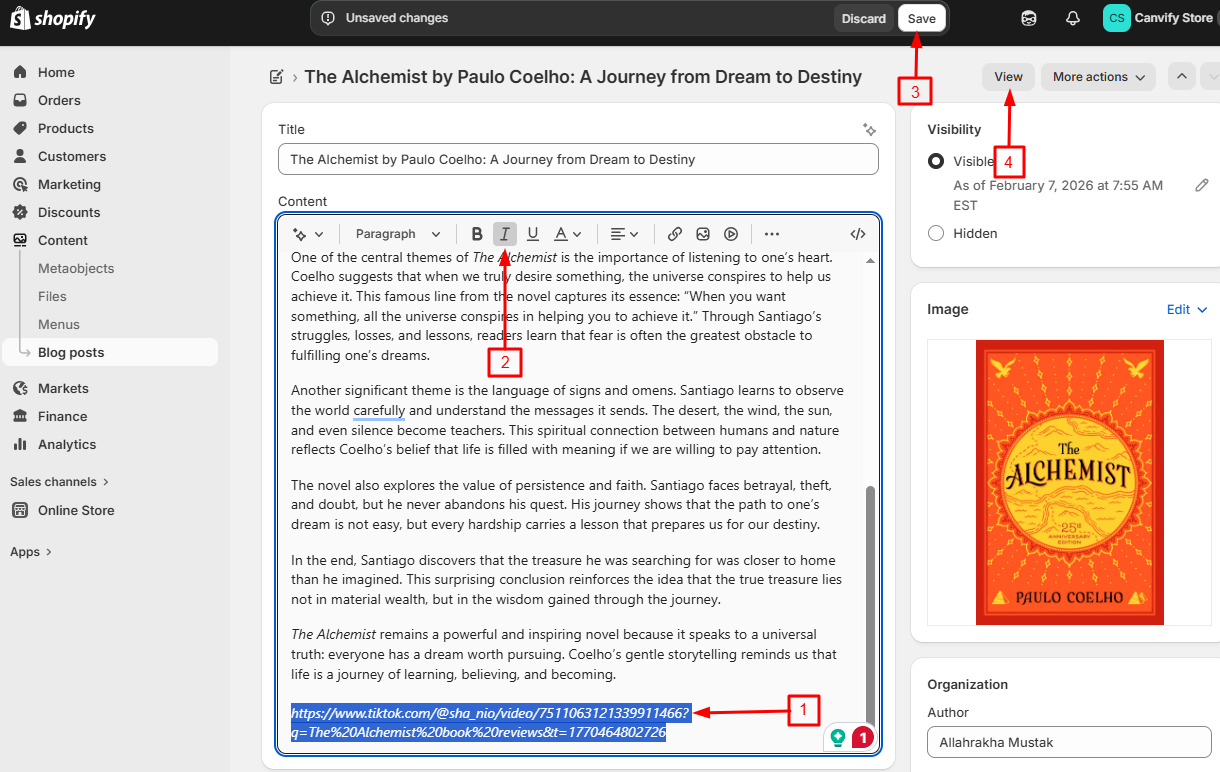
That’s it! Once you save, the plain TikTok link will transform into a fully interactive TikTok video player.

Best Places to Add TikTok Videos in Your Shopify Store
- Product descriptions: Show your products being used or reviewed
- Homepage: Feature your most popular or viral TikTok content
- Blog posts: Enhance written content with relevant TikTok videos
- About Us page: Share behind-the-scenes TikToks about your brand
Tips for Using TikTok Videos Effectively
- Choose videos that clearly demonstrate your products
- Use TikTok content that aligns with your brand’s style and message
- Mix professional content with authentic user-generated content
- Update your embedded videos regularly to keep content fresh
With EmbedAny, you can quickly add TikTok videos anywhere on your Shopify store without any technical knowledge or coding. This simple no-code solution works with 800+ platforms beyond just TikTok, making it incredibly versatile for all your embedding needs.
Start enhancing your Shopify store with engaging TikTok content today and watch as your customer engagement grows!