
Pricing Calculator for Shopify: How to Add an Interactive Calculator to Your Store
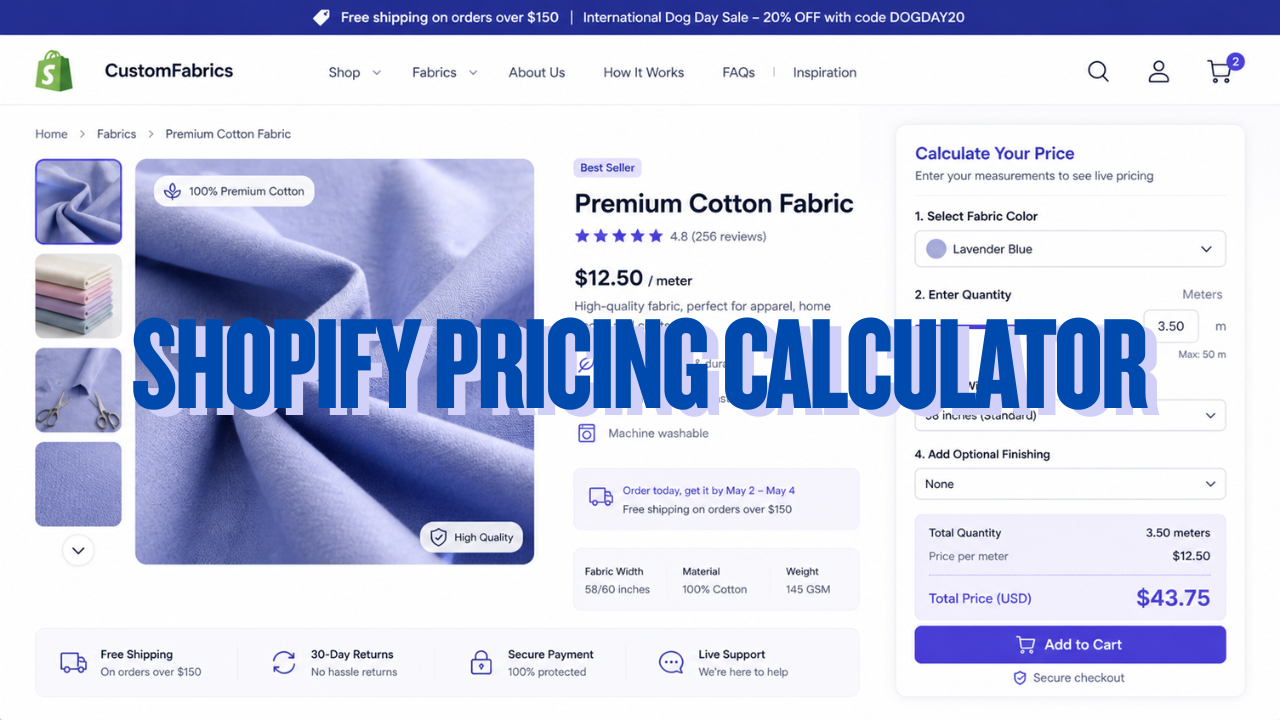
A customer lands on your product page. They want to buy custom fabric. They need 3.5 meters. They have no idea what it’ll cost them.
So they leave.
Not because the product was wrong. Not because the price was too high. Because you made them do the math themselves, and they couldn’t be bothered.
That’s the problem an interactive pricing calculator solves. It gives visitors instant, accurate, personalized pricing based on their specific inputs, before they ever reach checkout. No guesswork. No back-and-forth. No abandoned carts from customers who couldn’t figure out what they’d actually pay.
This guide covers every method available for adding a calculator to your Shopify store in 2026: dedicated Shopify apps, third-party calculators you embed, and custom-built calculators you create yourself using tools like Canva Code or Replit and deploy without a single line of code.
Why Your Shopify Store Needs an Interactive Calculator
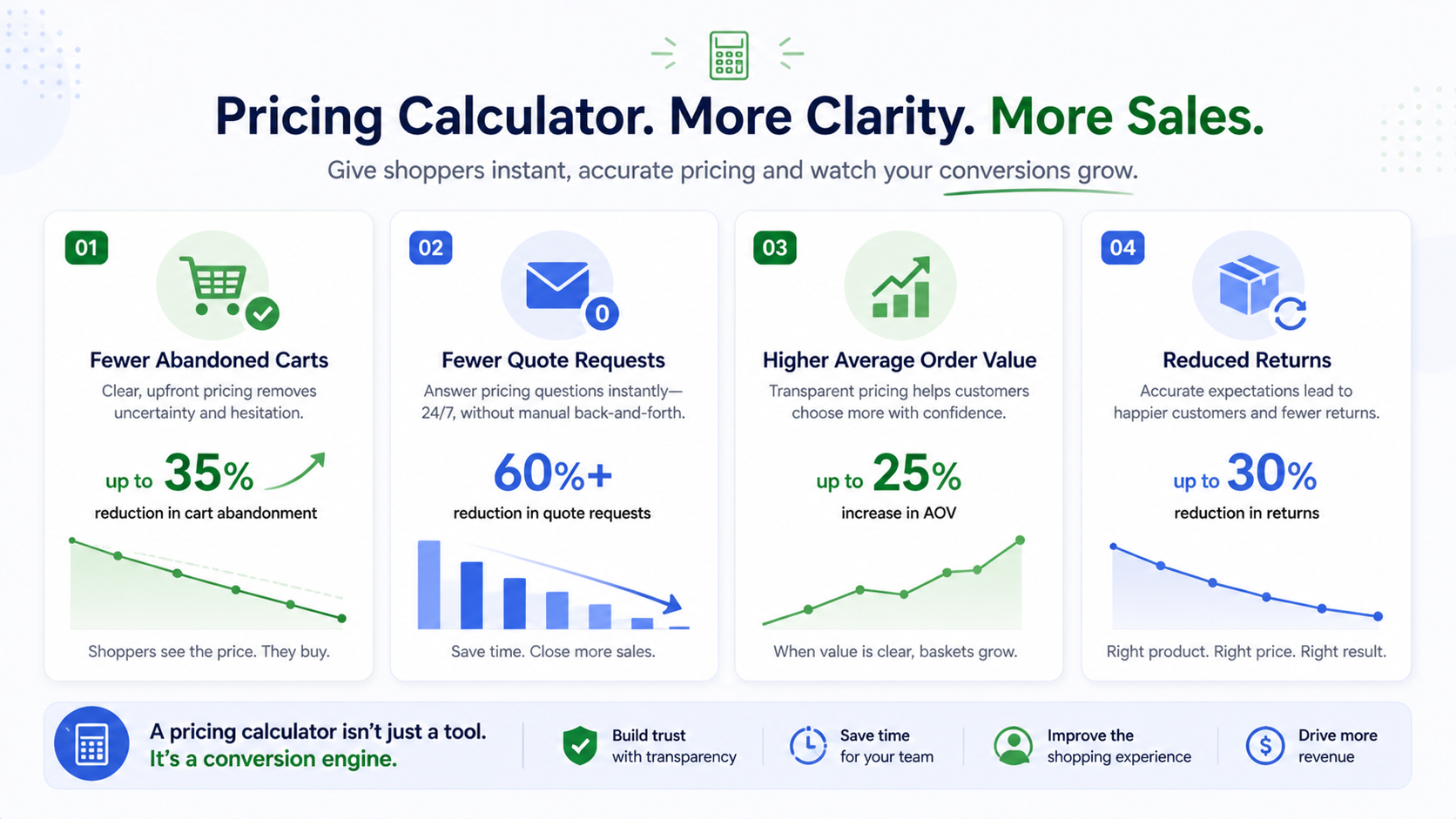
Pricing uncertainty is one of the highest-impact conversion killers in ecommerce, and it’s almost entirely invisible to most merchants.
Nearly half of online shoppers abandon carts because total costs are not clear upfront, according to research cited by Baymard Institute. For stores selling custom, variable, or measurement-based products, fabric, signage, flooring, foam, printing, custom furniture, personalized gifts, this problem is amplified. Your product page cannot show “the price” because there isn’t one until the customer configures their order.
The traditional workarounds both fail. Shopify variants cap out at 100 combinations. “Contact us for a quote” kills conversion immediately, customers want to know the price before they buy, not after a 48-hour email exchange.
A product pricing calculator fixes all of this. Here’s what it does for your store:
Fewer abandoned carts. When customers see the price before adding to cart, the uncertainty that drives abandonment disappears. They know exactly what they’re paying.
Fewer quote requests. Every pricing email you answer is a sale you almost lost. A calculator handles these 24 hours a day, with no manual effort.
Higher average order value. When customers can see how price scales with quantity or size, they often order more. Transparent pricing makes upsizing feel logical rather than risky.
More professional storefront. A store that shows accurate live pricing for complex products looks like a real, credible business.
The stores that need this most are selling by the meter, by square footage, by weight, by stitch count, by piece count, or with any combination of dimension inputs. If your pricing has a formula, you need a calculator.
Method 1: Dedicated Shopify Pricing Calculator Apps
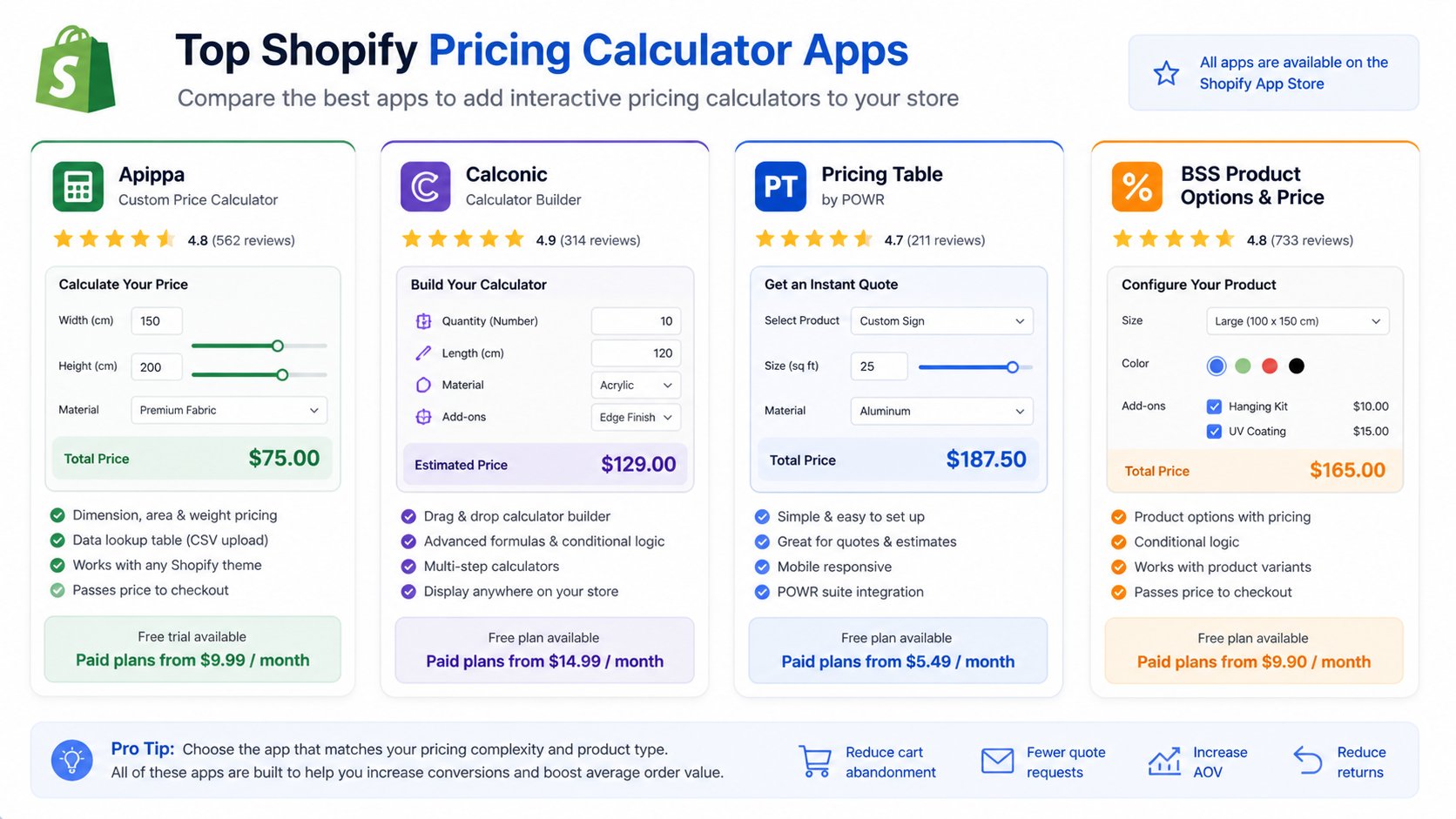
The fastest way to get a calculator on your store is through a purpose-built Shopify app. These install directly from the App Store, connect natively to your product pages, and pass calculated prices through to Shopify checkout correctly.
Apippa, Custom Price Calculator
Best for: Products priced by dimension, area, or weight. Wallpaper, fabric, flooring, signage, glass, foam.
Apippa is the most frequently recommended app for dimension and measurement-based pricing. You define a formula, width times height times price per square meter, for example, and customers enter their measurements. The price updates instantly on the product page. When they click Add to Cart, the calculated price passes through to checkout correctly as a line item.
One standout feature is the Data Lookup table. If your pricing does not follow a clean formula because it changes by material, finish, or tier, you can upload a CSV pricing table and Apippa looks up the correct price from it automatically. This is particularly useful for signage, packaging, and custom print shops where pricing grids are complex.
Apippa works with any Shopify theme through the Theme Editor, requires no code, and extends its free trial if you hit issues during setup.
Pricing: Free trial available. Paid plans from the App Store. Rating: 4.8/5 on the Shopify App Store.
Calconic, Calculator Builder
Best for: Merchants who need a fully custom drag-and-drop calculator with any logic type, not just measurement pricing.
Calconic takes a different approach. Instead of being purpose-built for dimension pricing, it is a general-purpose calculator builder. You drag in inputs (sliders, number fields, dropdowns, checkboxes), define your formulas, and the calculator renders on your store.
This gives it more flexibility than Apippa for unusual use cases. ROI calculators, savings estimators, bundle price builders, quote configurators for services, all of these can be built in Calconic without touching code.
The tradeoff is complexity. Calconic requires more setup time for straightforward dimension pricing compared to Apippa. For anything beyond “multiply two numbers by a rate,” it becomes the more powerful option.
Pricing: Paid plans from $9/month. Free plan available with limitations. Rating: 4.7/5 on the Shopify App Store.
GA: AI Custom Price Calculator
Best for: Stores wanting AI-assisted calculator setup with formula-based and measurement pricing in one tool.
This is one of the newer entries in the Shopify calculator space and one of the most versatile. It handles simple formula-based pricing, area and measurement calculations, savings estimators, and delivery cost calculators from a single interface. Flexible input types include number fields, sliders, dropdowns, and checkboxes.
The AI-assisted setup speeds up configuration for merchants who are not comfortable writing pricing formulas manually. Describe what you need and the app helps structure it.
Rating: Strong early reviews, 5.0 on the App Store. Good option for stores wanting AI to handle setup logic.
Options Price Calculator (SE)
Best for: Custom product stores with complex conditional logic, drapes, blinds, cabinet doors, sticker pricing, laser engraving.
SE: Option Price Calculator is the most powerful quoting system for stores with deeply complex pricing rules. If your price changes based on multiple interdependent selections, material, finish, size, and quantity all interacting with each other, this is the app that handles it.
Multiple reviewers describe it as the most advanced quoting system they’ve used for custom products. It is also more technically demanding to set up. For merchants with some coding knowledge or who want to invest in getting the configuration right, it handles logic that simpler apps cannot.
Rating: 5.0/5 on the Shopify App Store. Strong support team.
Ex Price Calculator (Measurement Price Calculator)
Best for: Products sold by length, weight, area, volume, or box. Wallpapers, tiles, carpets, fabric, murals.
Ex Price Calculator focuses specifically on measurement unit pricing. Customers enter their measurements in the relevant unit and the app calculates the price based on a unit rate you set. Minimum and maximum limits per dimension are supported. Measurements carry through to the cart and order detail page, so you always know exactly what dimensions the customer ordered.
Rating: 4.7/5. Responsive support team noted across multiple reviews.
Method 2: Embed a Third-Party Calculator Using EmbedAny
Not every calculator needs to be a Shopify-native app. If you already have a calculator hosted on another platform, a Calconic embed, an Elfsight widget, a ConvertCalculator build, you can bring it directly onto any Shopify page using EmbedAny.
EmbedAny is a Shopify app that supports 800+ platforms. The workflow is the same regardless of the source: paste the calculator’s public URL into any page, product description, or blog post, italicize the link (Ctrl+I or Cmd+I), and save. EmbedAny converts it into a live, interactive widget on your Shopify page.
This means:
- You can use the full Calconic builder on calconic.com, then embed the resulting calculator on Shopify without installing the Calconic Shopify app
- You can use Elfsight’s powerful calculator editor, generate its embed link, and embed it via EmbedAny
- Any ConvertCalculator, Outgrow, or Involve.me calculator with a shareable link can appear directly on your product page in seconds
The advantage is flexibility. You get the full power of specialized calculator platforms and bring the output into Shopify without being limited to whatever that platform’s Shopify integration supports.
For more on how EmbedAny handles external content embedding in Shopify, our guide on 3 easy ways to add any iframe in Shopify covers the full breakdown of why this approach outperforms raw iframe code.
Method 3: Build Your Own Calculator with Canva Code and Embed via Canvify
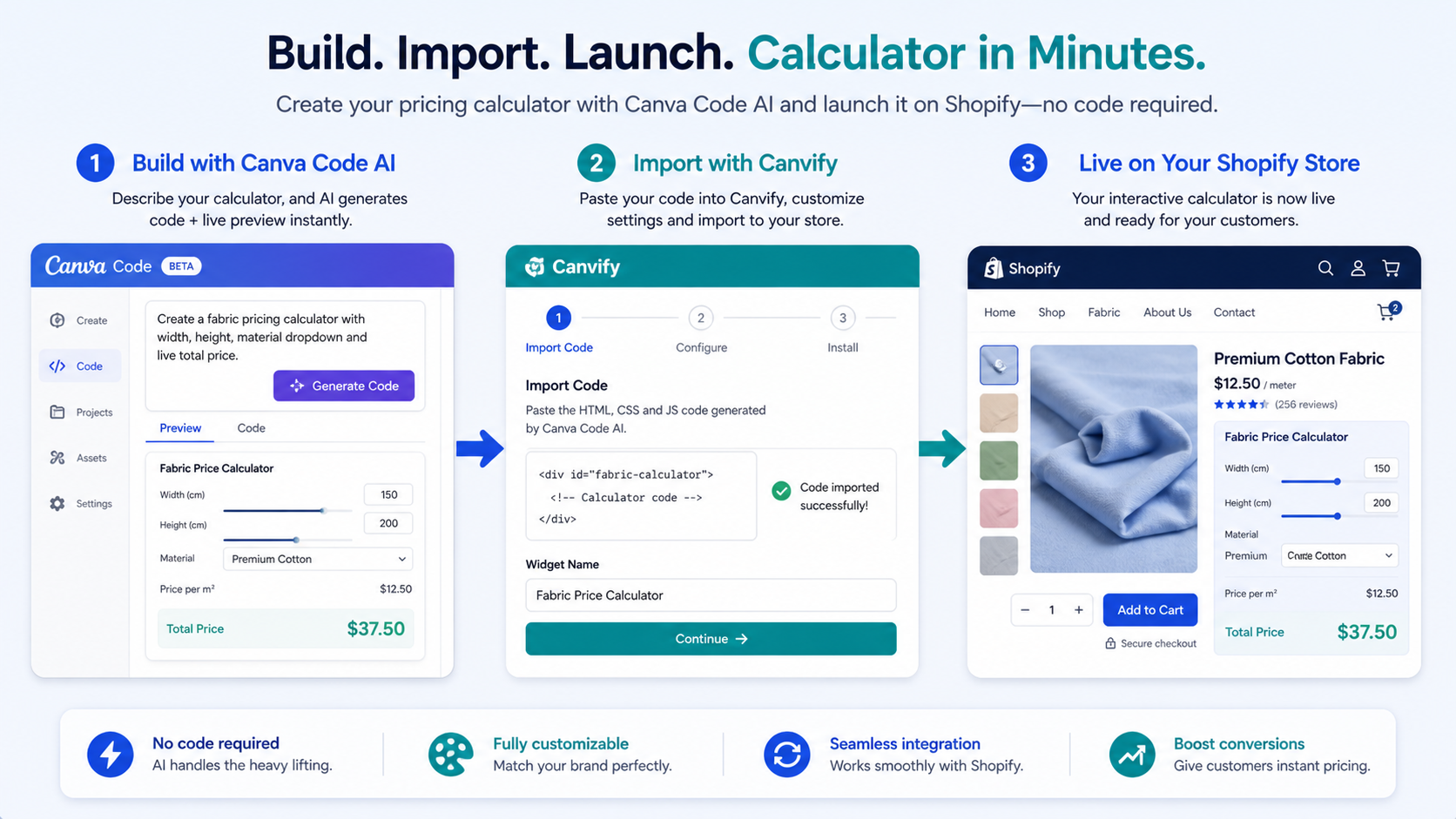
This is the option that surprises most merchants, and it’s the most powerful for stores that want a fully custom calculator with no app subscription and no developer involved.
Canva Code is Canva’s AI code generator. You describe the calculator you want in plain language, and Canva builds it as an interactive widget. No code needed on your part. Then Canvify imports your Canva design directly into Shopify as a native page, with the calculator live and functional.
For a full step-by-step walkthrough of building a calculator in Canva Code, see the Canvify guide to creating a calculator in Canva Code AI.
What You Can Build With Canva Code
Price Estimator Calculator. Enter quantity, unit price, material, and any add-ons. Output the subtotal, tax, and final cost. Perfect for custom jewelry stores, print-on-demand shops, or B2B product configurators.
Shipping Cost Calculator. Enter weight, destination, and shipping preference. Output estimated cost across standard, express, and overnight options. Reduces checkout surprises for stores with variable shipping.
Discount Savings Calculator. Show customers exactly how much they save with bundle discounts, loyalty rewards, or seasonal promotions. Especially effective for clearance events and Black Friday campaigns.
Size Recommendation Calculator. Enter height, weight, and body measurements. Output the recommended size. Reduces returns for apparel, footwear, and athletic gear stores.
Subscription Bundle Selector. Let customers choose their preferences and outputs the total with a per-month breakdown. High-retention use case for coffee, supplements, or subscription box stores.
ROI Calculator for B2B. Inputs: team size, current costs, your pricing. Output: monthly and annual savings. Justifies purchase decisions for B2B stores, agencies, and SaaS-adjacent ecommerce.
How to Build and Embed It
Step 1: Go to canva.com/ai/code and describe your calculator in plain language. For example: “Create a pricing calculator that multiplies width in meters by length in meters by a price per square meter of $24.99 and shows the total price.”
Step 2: Canva generates the calculator widget. Test the inputs and outputs. Refine with follow-up prompts: “Change the button color to navy,” “Add a shipping fee of $8.50 to the total,” “Label the result as Your Estimated Total.”
Step 3: Once you are happy with it, publish your Canva design as a website. Copy the published link.
Step 4: In Canvify, paste the Canva URL and import it. Canvify converts your Canva design into a native Shopify page, with the calculator fully functional.
Step 5: Assign the page in your Shopify admin and link to it from your product pages, navigation, or a banner.
The result is a completely custom calculator that looks exactly how you designed it, without a recurring app subscription per calculator, without generic widget styling, and without a developer.
A note on limitations: Canva Code works best for calculators with straightforward logic. It cannot access external databases, cannot process Shopify checkout directly, and has limited support for highly complex conditional pricing. For those cases, one of the Shopify-native apps above is the better route.
Method 4: Build a Custom Calculator with Replit and Embed via EmbedAny
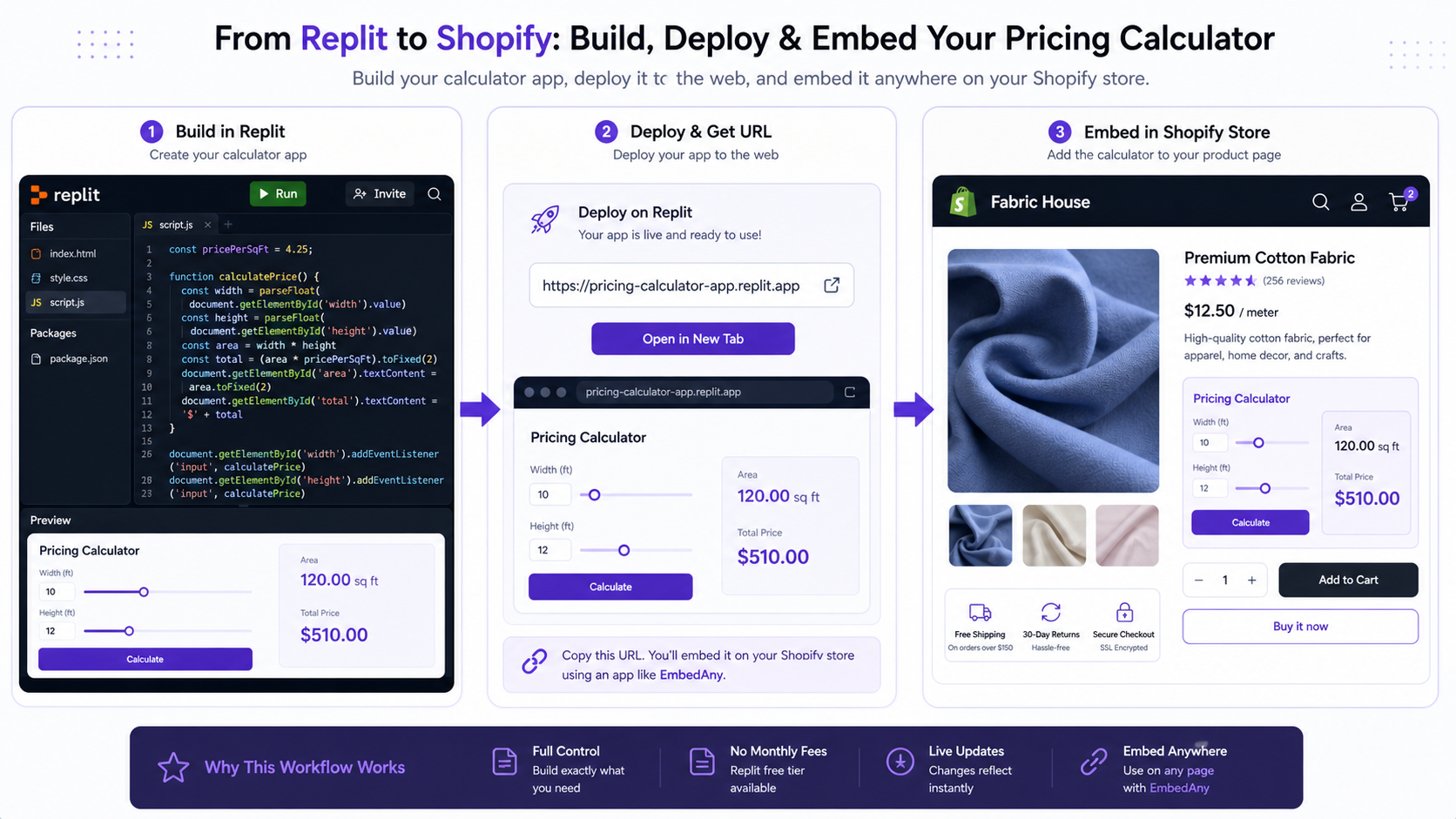
Replit is an online coding environment that lets you build and deploy web applications entirely in the browser. If you have any coding ability, or want to use Replit’s AI agent to build a calculator for you, you can deploy it as a live web app and embed it on Shopify in seconds using EmbedAny.
This gives you complete control. You can build a calculator that:
- Connects to a pricing spreadsheet or external database
- Handles any conditional logic no matter how complex
- Matches your exact brand styling and UX
- Updates in real time when you change the underlying logic
The EmbedAny embed guide for Replit is already documented on the EmbedAny blog: how to integrate Replit apps and code snippets in your Shopify store. The workflow is identical to any other EmbedAny embed. Deploy your Replit app, copy the public URL, paste it into Shopify, italicize it, and it becomes a live interactive widget.
This method is best for merchants with some development experience or who are comfortable using AI tools like Replit’s agent to generate the calculator logic.
Choosing the Right Method for Your Store
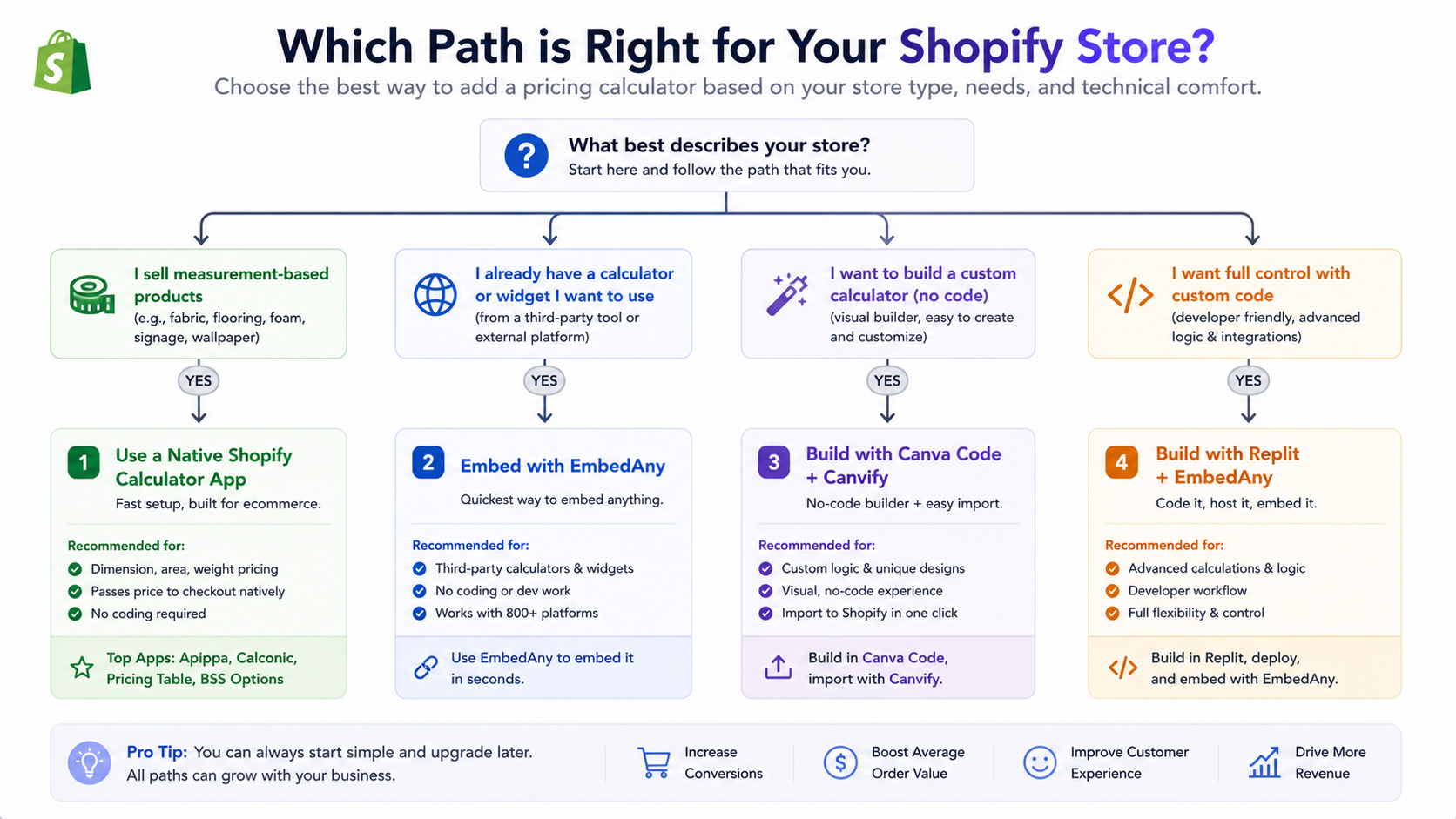
| Your situation | Best approach |
|---|---|
| Products priced by dimension or area | Apippa or Ex Price Calculator |
| Complex conditional logic, many variables | SE: Option Price Calculator or Calconic |
| Already have a calculator on another platform | Embed it via EmbedAny |
| Want a fully custom look with no dev | Canva Code plus Canvify |
| Comfortable with code or AI agents | Replit plus EmbedAny |
| Quick ROI or savings estimator | Calconic or GA: AI Calculator |
If you are selling fabric, wallpaper, flooring, signage, or any product priced by measurement, start with Apippa. It is the most purpose-built for this use case and the setup is straightforward.
If you need a general-purpose calculator with custom logic for any use case, Calconic gives you the most flexibility.
If you want a fully custom, branded calculator that does not look like a generic widget and does not require a recurring app subscription, Canva Code plus Canvify is the most underrated option on this list.
Where to Place Your Calculator on Shopify
Placement matters as much as functionality. A calculator buried at the bottom of a product page does not solve the problem for visitors who leave after three seconds.
On the product page, between description and add-to-cart. This is the highest-impact placement for measurement and pricing calculators. Visitors reach the calculator at the moment they need to know the cost, not after they’ve already decided to leave.
On a dedicated landing page. For stores with complex products or a B2B audience, a standalone “Get a Quote” or “Calculate Your Price” page linked from the navigation is a clean solution. Use Canvify to build this page with your Canva Code calculator embedded.
In product descriptions. EmbedAny lets you paste and italicize a calculator URL directly inside a product description field. This is useful when you want the calculator scoped to a specific product without modifying your theme.
In a blog post. Calculators embedded in blog content (ROI calculators, savings estimators, size guides) turn informational traffic into interactive engagement and direct visitors toward your products.
Final Thoughts
A pricing calculator is not a nice-to-have feature for custom product stores. It is the difference between a sale and a bounce.
The best method depends on how you sell. If your products have dimension-based pricing, install Apippa or Ex Price Calculator and get it live on your product pages this week. If you want something fully custom and branded without a developer, build it in Canva Code and bring it into Shopify with Canvify. If you need maximum flexibility and have any coding comfort, Replit plus EmbedAny gives you complete control over every aspect of the calculator.
Whichever route you choose, the output is the same: visitors get clear pricing before they commit, and your store stops losing sales to uncertainty.
For more on increasing Shopify conversions through interactive content, read our guide on why your Shopify store is not making sales.
FAQs
best pricing calculator apps for shopify stores
The top-rated pricing calculator apps for Shopify in 2026 are Apippa (best for dimension and measurement-based pricing), Calconic (best for fully custom drag-and-drop calculator logic), SE: Option Price Calculator (best for complex conditional pricing), and GA: AI Custom Price Calculator (best for AI-assisted setup). Each app integrates directly with Shopify product pages and passes calculated prices through to checkout correctly.
what is a dynamic pricing tool for online stores
A dynamic pricing tool calculates and displays product prices in real time based on customer inputs. Instead of showing a fixed price, it updates the total as the customer selects options, enters dimensions, changes quantities, or configures a product. On Shopify, dynamic pricing tools typically appear as calculator widgets on product pages that respond instantly to input changes.
how to use a shopify pricing calculator for product costs
Install a pricing calculator app from the Shopify App Store, or build a custom calculator using Canva Code and import it with Canvify. Once installed, you define your pricing formula (for example, width times height times unit rate), configure the input fields, and embed the calculator on your product page. Customers enter their specifications and see the total price instantly. The calculated price passes to Shopify checkout automatically.
how do profit margin calculators help e-commerce businesses
Profit margin calculators help ecommerce store owners set prices that cover costs and hit target margins, rather than guessing. They typically take inputs like product cost, shipping cost, payment processing fees, and desired margin, then output the recommended retail price. Internally, they prevent underpricing on custom orders. Externally, some stores embed margin-aware quote calculators that customers use to configure orders with full cost transparency.
top-rated pricing calculator tools compatible with shopify
Top-rated Shopify-compatible pricing calculator tools include Apippa (4.8 stars), SE: Option Price Calculator (5.0 stars), Calconic Calculator Builder (4.7 stars), and GA: AI Custom Price Calculator (5.0 stars). For merchants who want to embed an external calculator without a dedicated app, EmbedAny supports third-party calculators from Calconic, Elfsight, ConvertCalculator, and other platforms by pasting a link directly onto any Shopify page.
best apps to calculate custom product pricing on an e-commerce platform
For custom product pricing on Shopify, the best apps are Apippa for measurement-based products (fabric, signage, flooring), SE: Option Price Calculator for complex conditional logic (custom furniture, blinds, embroidery), and Calconic for general-purpose formula calculators. Each app lets customers configure their order and see an accurate price before adding to cart, eliminating manual quote requests.
where to find a free shopify pricing calculator online
Free or free-trial options include Calconic (free plan with limited features), Elfsight Calculator (free plan available), and GA: AI Custom Price Calculator (free install with trial). Alternatively, you can build a fully custom calculator using Canva Code at no cost, then embed it on Shopify via Canvify. For basic calculators, Canva Code plus Canvify is the most cost-effective route for merchants who want a branded, custom experience without a recurring app fee.
where can i find a bulk discount estimator for my online shop
Bulk discount estimators can be built using Calconic’s drag-and-drop calculator builder, where you define quantity tiers and price breaks. Elfsight’s Calculator widget also supports tiered pricing logic. For a fully custom approach, Canva Code can generate a bulk discount calculator from a plain-language prompt. Once built, embed it on your Shopify store using EmbedAny or Canvify. Place it on collection pages or product pages where bulk ordering is most common.
pricing calculator features to look for in shopify apps
The key features to evaluate in a Shopify pricing calculator app: formula flexibility (can it handle your specific pricing logic, whether multiplication by dimension, conditional rules, or data lookups), checkout integration (does the calculated price pass correctly to the Shopify cart and order admin), mobile responsiveness (does it work cleanly on phones), input variety (sliders, dropdowns, number fields, checkboxes), and theme compatibility. For complex products, also check whether the app supports multiple calculators per product and real-time price breakdowns.
solutions for tiered pricing display on an e-commerce storefront
The best solutions for displaying tiered pricing on a Shopify storefront are SE: Option Price Calculator (supports conditional logic across multiple interdependent tiers), Calconic (supports tiered formulas with if/then logic), and GA: AI Custom Price Calculator (supports tiered pricing with dropdown and checkbox inputs). For a fully custom approach, you can build a tiered pricing table or calculator in Canva Code and embed it on any product or collection page via Canvify, with no recurring app fee.